

理解 WooCommerce 系統狀態報告
WooCommerce 系統狀態報告對商店疑難排解非常有用。包含大量資訊與工具,你可從中檢查軟體版本、伺服器設定等更多內容。
系統狀態
建議你在開啟 Woo Support 支援請求前先使用以下資訊。但需要時我們會提供協助。檢視系統狀態報告並複製以取得支援:
- 前往: WooCommerce > Status。
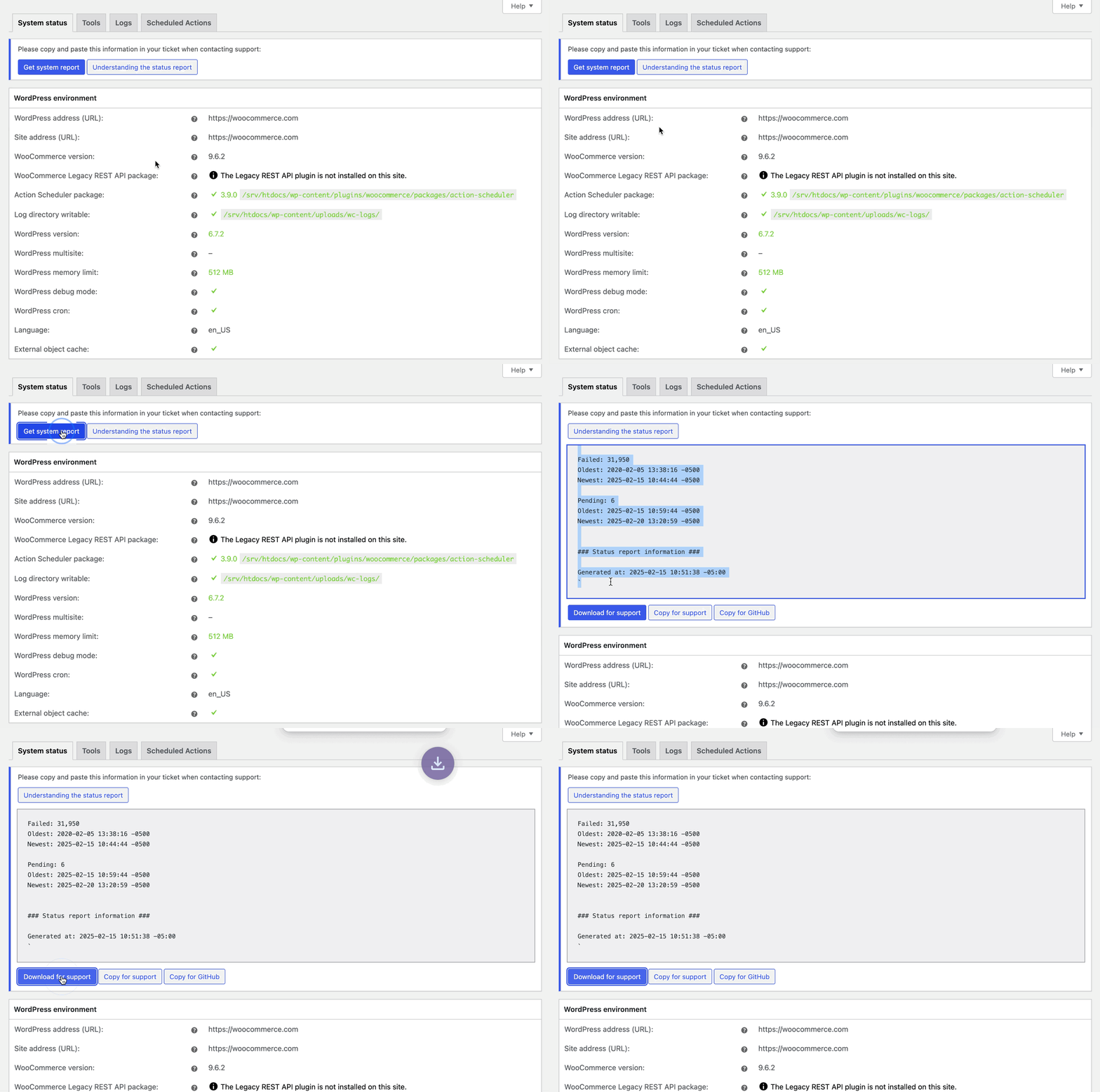
WordPress 環境
提供關於你的網站與 WordPress 安裝及已啟用功能的一般資訊。
| 欄位名稱 | 說明 | 範例 |
|---|---|---|
| WP address (URL) | 網站首頁的 URL。 | https://example.com |
| Site address (URL) | 網站的根 URL。 | https://example.com |
| WC Version | 網站安裝的 WooCommerce 版本。 | 6.5.1 |
| WC REST API package | 網站安裝的 WooCommerce REST API 套件版本。 | 6.5.1 /srv/htdocs/wp-content/plugins/woocommerce/packages/woocommerce-rest-api |
| WC Blocks package | 網站安裝的 WooCommerce Blocks 套件版本。 | 7.4.3 /srv/htdocs/wp-content/plugins/woocommerce/packages/woocommerce-blocks/ |
| Action Scheduler package | 網站安裝的 Action Scheduler 套件版本。 | 3.4.0 /srv/htdocs/wp-content/plugins/woocommerce/packages/action-scheduler |
| Log Directory Writable | WooCommerce 日誌目錄是否可寫入,以及位置。 | ✔ /srv/www/wp-content/uploads/wc-logs/ |
| WP Version | 網站安裝的 WordPress 版本。 | 6.0 |
| WP Multisite | 是否已啟用 WordPress Multisite。 | – (no) |
| WP Memory Limit | 網站一次可使用的最大記憶體(RAM)。在此了解如何增加此限制。 | 256 MB |
| WP Debug Mode | 顯示 WordPress 是否處於 Debug 模式。 | – |
| WP Cron | 顯示 WordPress Cron 是否已啟用。 | ✔ |
| Language | WordPress 目前使用的語言。預設為 English | en_US |
| External Object Cache | WordPress 是否使用外部快取。 | ✔ |
伺服器環境
提供關於伺服器的一般資訊。
| 欄位名稱 | 說明 | 範例 |
|---|---|---|
| Server Info | 目前託管網站的網頁伺服器資訊。 | nginx / apache |
| PHP Version | 託管伺服器上安裝的 PHP 版本。 | 8.1.5 |
| PHP Post Max Size | 單一 post 中可包含的最大檔案大小。 | 1 GB |
| PHP Time Limit | 網站在單一操作上花費的時間(秒),逾時前以避免伺服器鎖定。 | 1200 |
| PHP Max Input Vars | 伺服器對單一函數可使用的最大變數數量,以避免超載。 | 6144 |
| cURL Version | 伺服器上安裝的 cURL 版本(若有)。 | 7.83.0, OpenSSL/1.1.1o |
| SUHOSIN Installed | Suhosin 是 PHP 安裝的進階保護系統。其設計是保護伺服器免受 PHP 應用程式中許多已知問題的影響,以及這些應用程式或 PHP 核心本身可能存在的未知漏洞。若在伺服器上啟用,Suhosin 可能需要設定以增加其資料提交限制。更多資訊請參考:資料未儲存變化與費率。 | – |
| MySQL Version | 託管伺服器上安裝的 MySQL 版本。 | 5.6.47-13.1.20 |
| Max Upload Size | 可上傳至 WordPress 安裝的最大檔案大小。 | 2GB |
| Default Timezone is UTC | 伺服器時區是否為 UTC。 | ✔ |
| fsockopen/cURL | 金流可使用 cURL 與遠端伺服器通訊以授權付款。其他外掛在與遠端服務通訊時也可能使用它。 | ✔ |
| SoapClient | 某些 Web 服務使用 SOAP 從遠端伺服器取得資訊,例如 FedEx 的即時物流報價需要安裝 SOAP。 | ✔ |
| DOMDocument | HTML/Multipart 電子郵件使用 DOMDocument 在範本中產生 inline CSS。 | ✔ |
| GZip | GZip (gzopen) 用於開啟 MaxMind 的 GEOIP 資料庫。 | ✔ |
| Multibyte String | Multibyte String (mbstring) 函數用於支援 UTF-8 字元。 | ✔ |
| Remote Post | PayPal 在回傳交易資訊時使用此通訊方法。更多資訊請參考:wp_remote_post Codex 頁面。 | ✔ |
| Remote Get | WooCommerce 外掛在檢查更新時可能使用此通訊方法。 | ✔ |
資料庫
告訴你目前資料庫版本,並列出所有資料庫表及是否存在。
| 欄位名稱 | 範例 |
|---|---|
| **WC Database Version | |
| ** 資料庫格式化對應的 WooCommerce 版本。 | 6.5.1 |
| Database prefix | wp_ |
| Total Database Size | 2.06MB |
| Database Data Size | 8.48MB |
| Database Index Size | 2.21MB |
| wp_woocommerce_sessions | Data: 0.02MB + Index: 0.02MB + Engine InnoDB |
| wp_woocommerce_api_keys | Data: 0.02MB + Index: 0.03MB + Engine InnoDB |
| wp_woocommerce_attribute_taxonomies | Data: 0.02MB + Index: 0.02MB + Engine InnoDB |
| wp_woocommerce_downloadable_product_permissions | Data: 0.02MB + Index: 0.06MB + Engine InnoDB |
| wp_woocommerce_order_items | Data: 0.02MB + Index: 0.02MB + Engine InnoDB |
| wp_woocommerce_order_itemmeta | Data: 0.02MB + Index: 0.03MB + Engine InnoDB |
| wp_woocommerce_tax_rates | Data: 0.02MB + Index: 0.06MB + Engine InnoDB |
| wp_woocommerce_tax_rate_locations | Data: 0.02MB + Index: 0.03MB + Engine InnoDB |
| wp_woocommerce_shipping_zones | Data: 0.02MB + Index: 0.00MB + Engine InnoDB |
| wp_woocommerce_shipping_zone_locations | Data: 0.02MB + Index: 0.03MB + Engine InnoDB |
| wp_woocommerce_shipping_zone_methods | Data: 0.02MB + Index: 0.00MB + Engine InnoDB |
| wp_woocommerce_payment_tokens | Data: 0.02MB + Index: 0.02MB + Engine InnoDB |
| wp_woocommerce_payment_tokenmeta | Data: 0.02MB + Index: 0.03MB + Engine InnoDB |
| wp_woocommerce_log | Data: 0.02MB + Index: 0.02MB + Engine InnoDB |
| wp_actionscheduler_actions | Data: 0.02MB + Index: 0.11MB + Engine InnoDB |
| wp_actionscheduler_claims | Data: 0.02MB + Index: 0.02MB + Engine InnoDB |
| wp_actionscheduler_groups | Data: 0.02MB + Index: 0.02MB + Engine InnoDB |
| wp_actionscheduler_logs | Data: 0.02MB + Index: 0.03MB + Engine InnoDB |
| wp_commentmeta | Data: 0.02MB + Index: 0.03MB + Engine InnoDB |
| wp_comments | Data: 0.02MB + Index: 0.09MB + Engine InnoDB |
| wp_links | Data: 0.02MB + Index: 0.02MB + Engine InnoDB |
| wp_mailchimp_carts | Data: 0.02MB + Index: 0.00MB + Engine InnoDB |
| wp_mailchimp_jobs | Data: 0.02MB + Index: 0.00MB + Engine InnoDB |
| wp_options | Data: 2.05MB + Index: 0.06MB + Engine InnoDB |
| wp_postmeta | Data: 0.06MB + Index: 0.03MB + Engine InnoDB |
| wp_posts | Data: 0.05MB + Index: 0.06MB + Engine InnoDB |
| wp_termmeta | Data: 0.02MB + Index: 0.03MB + Engine InnoDB |
| wp_terms | Data: 0.02MB + Index: 0.03MB + Engine InnoDB |
| wp_term_relationships | Data: 0.02MB + Index: 0.02MB + Engine InnoDB |
| wp_term_taxonomy | Data: 0.02MB + Index: 0.03MB + Engine InnoDB |
| wp_usermeta | Data: 0.02MB + Index: 0.03MB + Engine InnoDB |
| wp_users | Data: 0.02MB + Index: 0.05MB + Engine InnoDB |
| wp_wc_admin_notes | Data: 0.02MB + Index: 0.00MB + Engine InnoDB |
| wp_wc_admin_note_actions | Data: 0.02MB + Index: 0.02MB + Engine InnoDB |
| wp_wc_category_lookup | Data: 0.02MB + Index: 0.00MB + Engine InnoDB |
| wp_wc_customer_lookup | Data: 0.02MB + Index: 0.03MB + Engine InnoDB |
| wp_wc_download_log | Data: 0.02MB + Index: 0.03MB + Engine InnoDB |
| wp_wc_order_coupon_lookup | Data: 0.02MB + Index: 0.03MB + Engine InnoDB |
| wp_wc_order_product_lookup | Data: 0.02MB + Index: 0.06MB + Engine InnoDB |
| wp_wc_order_stats | Data: 0.02MB + Index: 0.05MB + Engine InnoDB |
| wp_wc_order_tax_lookup | Data: 0.02MB + Index: 0.03MB + Engine InnoDB |
| wp_wc_product_meta_lookup | Data: 0.02MB + Index: 0.09MB + Engine InnoDB |
| wp_wc_tax_rate_classes | Data: 0.02MB + Index: 0.02MB + Engine InnoDB |
| wp_wc_webhooks | Data: 0.02MB + Index: 0.02MB + Engine InnoDB |
文章類型計數
顯示商店中存在哪些文章類型,以及每種類型中有多少文章。依安裝的外掛而異。
| 文章類型名稱 | 計數 | |
|---|---|---|
| attachment | 16 | |
| customize_changeset | 3 | |
| nav_menu_item | 5 | |
| page | 7 | |
| post | 25 | |
| product | 36 | |
| product_variation | 4 | |
| scheduled-action | 2 | |
| shop_order | 10 |
安全性
顯示連線是否受保護。錯誤訊息應對試圖檢視資訊的不信任訪客隱藏。
安全性| |
---|---|---
Secure connection (HTTPS):| 商店連線是否安全?| ✔
Hide errors from visitors| 錯誤訊息可能包含關於商店環境的敏感資訊。這些應對不信任訪客隱藏。| ✔
啟用的外掛
顯示網站上所有已安裝並啟用的外掛。你可檢視軟體目前版本號,以及是否有擴充功能更新可用。
啟用的外掛 (5)|
---|---
Jetpack by WordPress.com| by Automattic – 10.9.1
WooCommerce Blocks| by Automattic – 7.7.0
WooCommerce| by Automattic – 6.5.1
WooCommerce Stripe Gateway| by WooCommerce – 6.4.0
未啟用的外掛
顯示網站上所有已安裝但未啟用的外掛。你可檢視軟體目前版本號,以及是否有擴充功能更新可用。
未啟用的外掛 (3)|
---|---
Classic Editor| by WordPress Contributors – 1.5
Health Check & Troubleshooting| by The WordPress.org community – 1.4.2
Homepage Control| by WooThemes – 2.0.3
Dropin 外掛
這些位於 wp-content 但僅限特定檔案名稱。它們會取代/增強 WordPress 內非常特定的功能。
Dropin 外掛 (1)|
---|---
object-cache.php| Memcached
設定
顯示網站的一般設定。
| 欄位名稱 | 說明 | 範例 |
|---|---|---|
| API Enabled | 網站是否已啟用 REST API? | ✔ |
| Force SSL | 網站是否強制交易使用 SSL 憑證? | ✔ |
| Currency | 價格顯示與處理付款使用什麼貨幣 | USD ($) |
| Currency Position | 顯示價格時貨幣符號的位置。 | left |
| Thousands Separator | 顯示價格時用於千位分隔的字元。 | , |
| Decimal Separator | 顯示價格時用於小數點的字元。 | . |
| Number of Decimals | 顯示價格時小數點後顯示的位數。 | 2 |
| Taxonomies: Product types | 用於商品類型/狀態的詞彙 | booking, bundle, external, grouped, simple, subscription, variable |
| Taxonomies: Product visibility | 用於商品可見性的詞彙清單。 | exclude-from-catalog, exclude-from-search, featured, outofstock, rated-1, rated-2, rated-3, rated-4, rated-5. |
| Connected to WooCommerce.com | 網站是否已連接至 WooCommerce.com? | ✔ |
| Enforce Approved Product Download Directories: | 是否強制執行已核准的商品下載目錄? | – |
WooCommerce 頁面
顯示指定為 WooCommerce 頁面的頁面 ID 與固定網址。
例如:若網站為 https://example.com,使用者可透過 https://example.com/cart/ 前往購物車頁面
| 欄位名稱 | 說明 | 範例 |
|---|---|---|
| Shop Base | WooCommerce 商店首頁的 URL(以及頁面 ID)。 | #3 – /shop/ |
| Cart | WooCommerce 商店購物車的 URL(以及頁面 ID)。 | #4 – /cart/ |
| Checkout | WooCommerce 商店結帳頁面的 URL(以及頁面 ID)。 | #5 – /checkout/ |
| My Account | WooCommerce 商店「我的帳號」頁面的 URL(以及頁面 ID)。 | #6 – /my-account/ |
| Terms and conditions | 條款與條件頁面的 URL。(以及頁面 ID)。 | #361 – /terms-and-conditions/ |
主題
顯示安裝上目前執行的主題資訊。
這可能是網站較容易出問題的區域,因為主題應該與不應該做的事情沒有標準,且非 Woo 主題可能與 WooCommerce 或其擴充功能產生衝突。
若網站遇到問題,建議暫時切換至免費的 Storefront Theme。若在 Storefront 主題啟用時問題解決,則問題出在主題。若要解決,請檢查更新或聯絡主題開發者查看是否有修正方案。
| 欄位名稱 | 說明 | 範例 |
|---|---|---|
| Name | 啟用主題的名稱。 | Pharmacy |
| Version | 目前啟用主題的安裝版本。 | 2.0.14 |
| Author URL | 開發者或主題 URL | https://woocommerce.com |
| Child Theme | 啟用的主題是否為子主題,以及父主題是什麼。 | ✔ |
| Parent theme name: | 父主題的名稱。 | Storefront |
| Parent theme version: | 父主題的版本。 | 4.1.0 |
| Parent theme author URL: | 父主題的開發者或主題 URL。 | https://woocommerce.com |
| WooCommerce Support | 主題是否宣告支援 WooCommerce。 | ✔ |
範本
此區塊顯示任何覆寫預設 WooCommerce 範本頁面的檔案,也會標註範本是否過時。
範本|
---|---
Overrides| child-theme/woocommerce/checkout/form-checkout.php
若任何顯示的頁面遇到問題,切換至 Storefront 主題將確保使用原始範本檔案。更多資訊請參考修正過時的 WooCommerce 範本檔案。若要長期修正,需要聯絡主題開發者。
Action Scheduler
顯示排程動作計數以及先前與最近日期。關於 Action Scheduler 的更多技術資訊與常見問題,請參考 ActionScheduler.org。
Action Scheduler
Version:| 3.4.0
Data store:| ActionScheduler_HybridStore
Action Status| | Count| Oldest Scheduled Date| Newest Scheduled Date
Canceled| | 3| 2020-02-27 18:22:53 +0000| 2020-08-29 14:18:37 +0100
Complete| | 35,320| 2020-02-20 10:01:00 +0000| 2020-03-06 13:15:31 +0000
Failed| | 68| 2018-03-12 10:18:36 +0000| 2019-11-28 13:26:52 +0000
Pending| | 20| 2020-03-06 13:16:31 +0000| 2020-04-01 04:00:00 +0100
無法存取系統狀態報告?
若因任何原因無法存取網站的系統狀態報告,你有幾個替代方案。
你可以嘗試直接前往相關頁面,網址為 [example.com]/wp-admin/admin.php?page=wc-status,將 example.com 替換為網站網域。
或者你可以從管理員首頁導航至 Tools > Site Health > Info > WordPress 並分享其中的資訊。與系統狀態報告類似,Site Health 報告也有複製到剪貼簿按鈕方便分享。
工具
工具分頁是 WooCommerce 系統工具的所在位置。這些設定可協助網站問題疑難排解、最佳化網站效能,以及管理設定。
日誌
日誌分頁是 WooCommerce 保存商店中所有事件日誌的地方。某些日誌如 fatal-errors 會自動保存,而其他日誌如金流相關的日誌,需要先在相關擴充功能的設定中啟用。
從此分頁,你可以點擊想檢視的日誌以開啟完整日誌檔案。或者你可以在搜尋框中輸入搜尋詞彙,在所有日誌檔案中搜尋。
若網站遇到嚴重錯誤,它們可能被記錄在此名為 fatal-errors 的日誌下。這在除錯時非常有用。
WooCommerce Shipping & Tax
WooCommerce Shipping & Tax 使用者有第五個分頁,可讓他們檢查擴充功能的健康狀況、使用中的特定服務、除錯區塊等更多內容。
Health 顯示連接部分的狀態 – WooCommerce 或 Jetpack 是否有任何需要注意的事項,以及 Services 是否正常運作或停機。
Services 顯示特定服務的運作狀況。可能是未使用、有需要注意的錯誤,或運作正常。你可以啟用除錯日誌來捕捉問題,也可以聯絡我們的支援團隊協助設定印表機以列印物流標籤。
排程動作
排程動作分頁可讓你檢視網站背景執行的流程日誌,包括訂閱續訂、某些客戶電子郵件,以及檢查主題或外掛更新等任務。你可以查看每個任務的狀態,以及哪些已完成、哪些待處理,以及任何失敗執行的更詳細錯誤資訊。