

Shortcodes 疑難排解
本頁列出 WooCommerce shortcodes 可能無法正常運作的常見原因。
若 shortcodes 正確貼上但顯示不正確,確認未被 <pre> 標籤包圍。
移除這些標籤:編輯頁面,點選文字分頁:

常見問題為使用直引號(")而非彎引號(")。shortcodes 要正常運作,必須使用直引號。
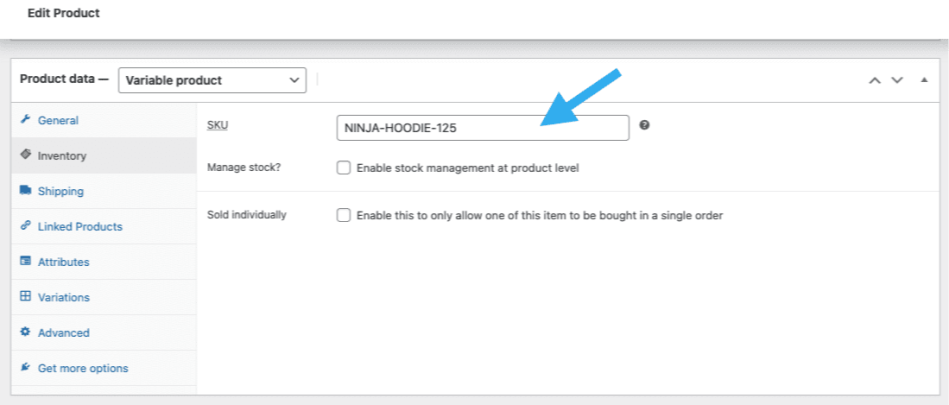
使用 SKU shortcode(如 [products skus="sku-name"])時,不可使用商品資料 > 可變商品 > 變化 > 變化名稱 > SKU 的變化名稱 SKU。
解決方法為使用父層可變商品商品資料中繼方塊的 SKU — 商品資料 > 可變商品 > 庫存 > SKU。
商品分類列表區塊顯示所有商品分類,包括頂層及子分類。無法僅顯示頂層分類。
以下程式碼片段新增一個新 shortcode — [top_level_product_categories_list] — 輸出僅包含頂層商品分類的項目列表。將其加入子佈景主題的 functions.php 檔案或透過程式碼片段擴充功能/外掛。
wc-shortcode-top-level-product-category-list.php content:
<?php
/*
 * The shortcode is [top_level_product_categories_list]
 */
add_shortcode('top_level_product_categories_list', 'wc_shortcode_top_level_product_categories_list');

function wc_shortcode_top_level_product_categories_list() {

   ob_start();

   $args = array(
        'taxonomy' => 'product_cat',
        'parent' => 0
    );

    $product_categories = get_categories($args);

    echo '<ul>';

    foreach ($product_categories as $category) {
        echo '<li><a href="' . get_term_link($category->slug, 'product_cat') . '">' . $category->name . '</a></li>';
    }

    echo '</ul>';

    return ob_get_clean();
}